 7103ffcdf3
|
||
|---|---|---|
| .gitignore | ||
| Dockerfile | ||
| LICENSE | ||
| README.md | ||
| config.py | ||
| demo.jpg | ||
| demo2.jpg | ||
| functional.py | ||
| main.py | ||
| predict.py | ||
| requirements.txt | ||
| show_math.py | ||


README.md
ChatGPT 学术优化
如果喜欢这个项目,请给它一个Star
- 支持GPT输出的markdown表格

- 如果输出包含公式,会同时以tex形式和渲染形式显示,方便复制和阅读

- 所有按钮都通过读取functional.py动态生成,可随意加自定义功能,解放粘贴板

- 代码的显示自然也不在话下 https://www.bilibili.com/video/BV1F24y147PD/

直接运行 (Windows or Linux)
# 下载项目
git clone https://github.com/binary-husky/chatgpt_academic.git
cd chatgpt_academic
# 配置 海外Proxy 和 OpenAI API KEY
config.py
# 安装依赖
python -m pip install -r requirements.txt
# 运行
python main.py
使用docker (Linux)
# 下载项目
git clone https://github.com/binary-husky/chatgpt_academic.git
cd chatgpt_academic
# 配置 海外Proxy 和 OpenAI API KEY
config.py
# 安装
docker build -t gpt-academic .
# 运行
docker run --rm -it --net=host gpt-academic
自定义新的便捷按钮
打开functional.py,只需看一眼就知道怎么弄了 例如
"英译中": {
    "Prefix": "请翻译成中文:\n\n",
    "Button": None,
    "Suffix": "",
},
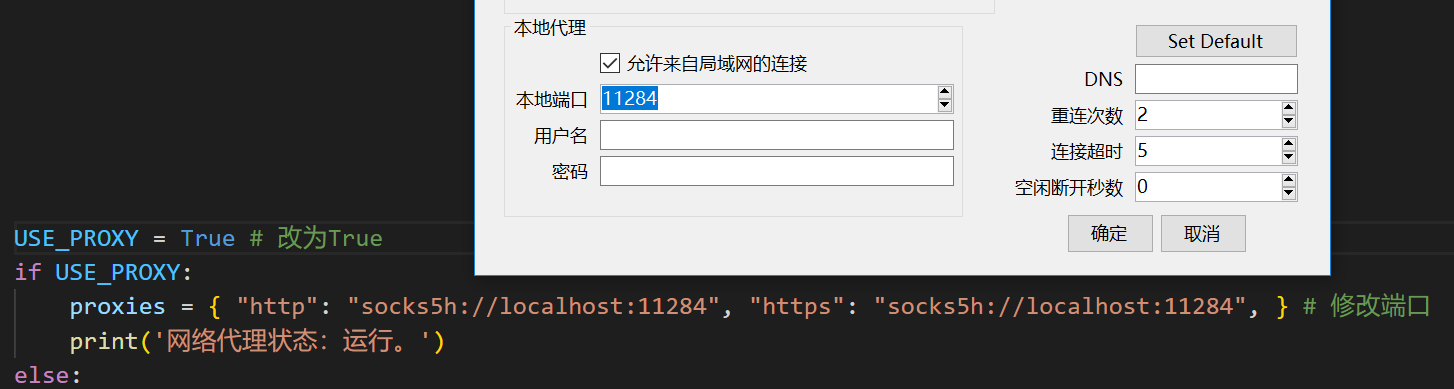
配置代理
修改端口与代理软件对应
参考项目
https://github.com/Python-Markdown/markdown
https://github.com/gradio-app/gradio
https://github.com/polarwinkel/mdtex2html
https://github.com/GaiZhenbiao/ChuanhuChatGPT